Reimagining the In-Store POS Experience
Designing faster, flexible, and associate-friendly checkout at scale
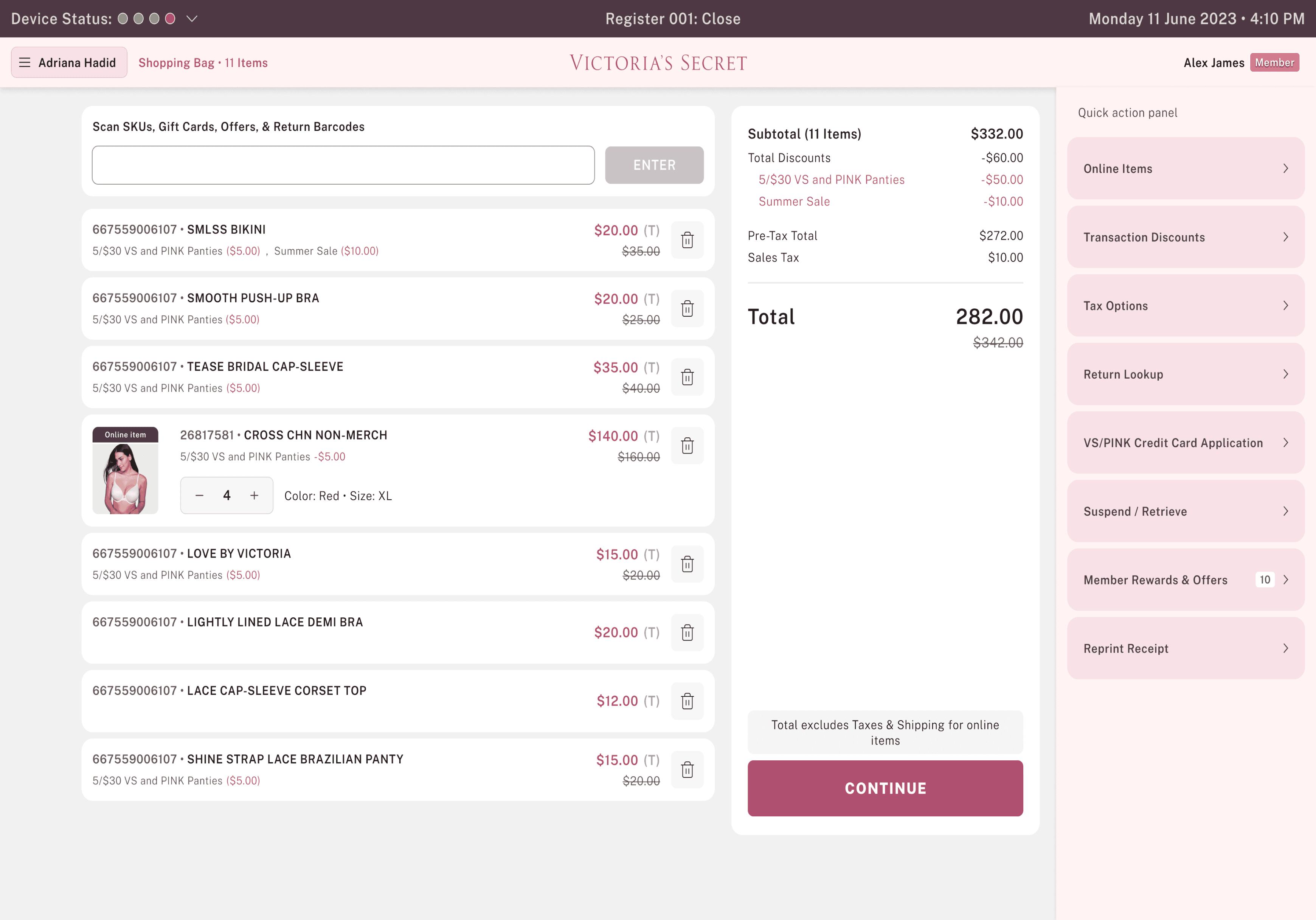
Overview
Retail checkout is a moment of truth—for both customers and store associates.
At Victoria’s Secret, the existing POS experience was built for traditional counter-based checkout, making it inefficient for modern store needs like aisle selling, item inquiry, and assisted checkout.
I led the UX design for desktop POS and mobile POS (mPOS) experiences to enable associates to serve customers anywhere in the store—reducing friction, speeding up transactions, and improving adoption at scale.
My Role
Krati Agarwal
Lead UX Designer, Researcher & Strategist
Team: 6 UX designers and a 2 UX researcher
Timeline: 6 months (Sep 2023 - Mar 2024)
Impact at a glance
30% Reduced Transaction Time
By simplifying and restructuring the navigation, we reduced the number of interactions required, resulting in faster transaction completion.
Improved Navigation and Fewer Clicks
A clearer, task-focused navigation structure minimized unnecessary clicks, helping associates find actions quickly and move through POS workflows with less hesitation.
70% Reduction in Errors Flows
By addressing error-prone steps and improving system feedback, POS-related issues—such as transaction errors and help-desk dependency—were significantly reduced.
Built a Scalable POS Foundation
A system-driven approach established consistent patterns and reusable components, enabling the POS to scale and evolve without reintroducing complexity.
Improved Associate Confidence and Adoption
Simpler workflows, predictable interactions, and clearer system feedback helped associates feel more confident using the POS, increasing adoption and reducing reliance on workarounds.


The Problem
The existing In-Store Point of Sale system (Oracle POS) is end of life and is only enabled at checkout terminals; Current solution difficult to support and slow for adding new features.
Slow & Complicated Navigation
Takes multiple clicks/steps even for simple tasks like finding a product by keyword or filters, slowing down associates.


Slow Transaction Processing
Processes like loyalty lookup, email capture, and credit card lookup take too long.

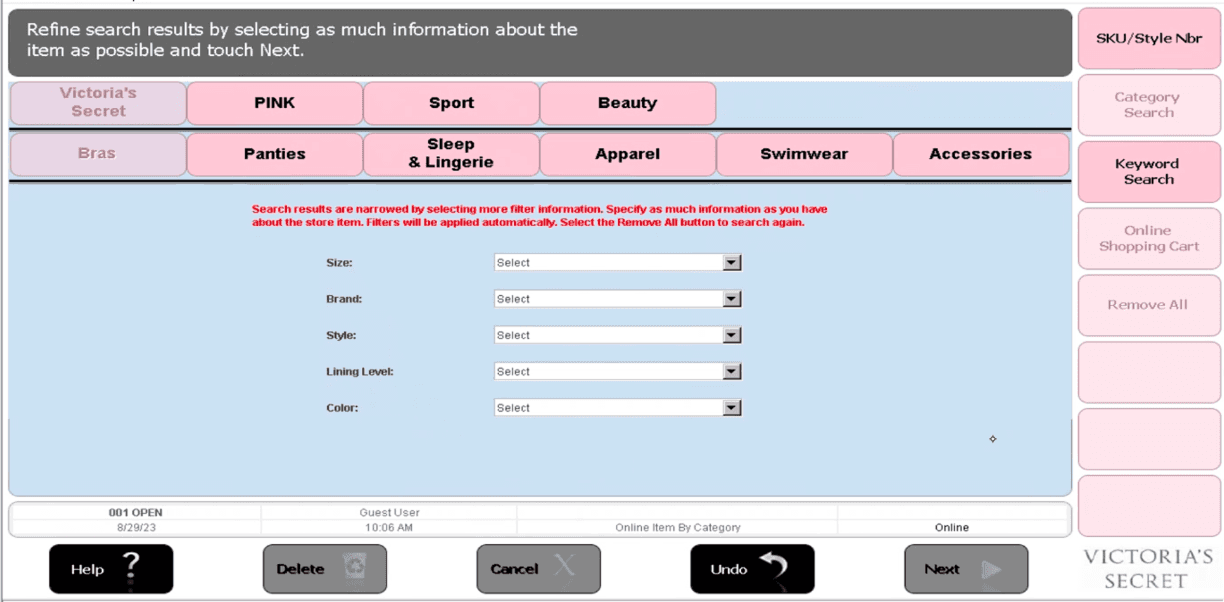
Outdated UI Limiting Usability
Cluttered layout with poor hierarchy.
Small, non–touch-friendly dropdowns for size/color.
Long red text instructions, hard to read in-store.

Design Goals
Designing a POS experience that performs under pressure—supporting faster transactions, confident associates, and seamless customer interactions at scale
01
Reduce Checkout Time
Enable associates to complete transactions quickly, especially during peak store hours.
02
Simplify High-Frequency Tasks
Optimize the most commonly used POS actions for speed and clarity.
03
Improve Learnability for New Associates
Make the POS intuitive enough to use with minimal training.
04
Reduce Errors and Transaction Failures
Prevent mistakes before they happen and support fast recovery when they occur.
05
Build a Scalable POS Foundation
The design needed to support future features and workflows while maintaining consistency and usability across all POS touchpoints.
06
Improve Associate and Customer Experience
Empower associates to serve customers with confidence, speed, and clarity.
My Design Process
Research
Ideating
Wire-framing
Design
Usability Testing
Users & Context
Primary Users
Our primary users were Store associates who rely on the POS to efficiently serve customers in fast-paced, high-traffic retail environments.
Store Associates
Have limited training time and need to start contributing quickly, often learning the system while on the job.

Store Managers
Have limited training time and need to start contributing quickly, often learning the system while on the job.

New
New & part-time associate
Have limited training time and need to start contributing quickly, often learning the system while on the job.
User Personas
Meet the associates who keep our store running: full-time and part-time staff juggling shifts, checkout counters, and floor duties, each with their own comfort level and challenges using the POS system.
Jessica Miller
New Part-Time Associate
22 Year Old, Full Time, 1 months at VS
just want to feel confident helping customers and using the POS correctly.
Responsibilities
Learning store layout
Assisting with simple customer inquiries
Handling POS under supervision
Processing returns, exchanges
Challenges
Needs training to learn POS work flows
Managing busy times,
Remembering promotions and sizing
Zoe Thompson
Sales Associate
22 Year Old, Full Time, 3 months at VS
I want to make sure customer should leave feeling valued and satisfied.
Responsibilities
Cash register operations
Processing transactions efficiently
Managing loyalty programs
Processing returns, exchanges
Challenges
Managing long checkout lines
Handling complex returns and exchange
Troubleshooting POS system issues
Maria Santos
Sales Associate
25 Year Old, Full Time, 2 Years at VS
“I want to make checkout fast and keep the customer happy and satisfied with the purchase.”
Responsibilities
Cash register operations
Processing customer transactions efficiently
Managing store credit cards and loyalty programs
Processing returns, exchanges
Maintaining cash drawer accuracy and end-of-day reconciliation
Challenges
Managing long checkout lines during peak hours
Handling complex returns and exchange
Troubleshooting POS system issues
Dealing with payment disputes and declined cards
Research & Discovery
We spoke to store associates, conducted workshops to understand their pain points
Discovery workshop with store associates & project managers
We conducted workshops with key store stakeholders—including Store Associates, Product Managers, and Developers—to gain a deep understanding of the challenges and pain points in the current POS systems.
To document these insights, we created a Miro board capturing all existing scenarios and the processes involved in the current POS workflows.

Research Plan & Insights
To design a POS experience that genuinely supported associates, we invested in understanding their daily workflows, device interactions, and expectations by studying how POS tools were used in real retail settings.
Our researchers visited 8 stores to observe real in-store scenarios, capturing how associates interact with customers, manage transactions, and navigate the POS and mPOS systems during daily operations.
Focus Area:
Sample Questions
Workflow
Walk me through your typical day — what are your top recurring POS tasks?
Pain Points
When do you feel the system slows you down or gets in your way?
Efficiency
Are there moments when you need to switch between multiple systems or devices?
Error Handling
What happens when a product isn’t found in the system?
Expectations
If you could change one thing about the POS, what would it be?
Customer Impact
How does the current POS affect your interaction with customers?
What Our Associates Says
Our researchers visited 8 stores to observe real in-store scenarios and interviewed associates to understand current workflows, pain points, and expectations from the POS system.
Slow System
POS slows down during peak hours, frustrating staff and customers.
Too many steps
Applying promotions or offers takes multiple steps, slowing down checkout.
Poor Navigation
Switching between multiple screens is confusing and reduces efficiency.
Lack of Guidance
Associates often rely on manuals or peers for basic tasks.
“Sometimes the system lags so much during sales that customers get impatient.“
~ Store Associate
It takes too many clicks just to apply a simple discount.
~ Store Associate
I keep going back to the manual for tasks I should already know.
~ Store Associate
Understanding Workflows
We analyzed the existing POS by mapping current-state user flows and layering associate pain points directly onto each step. This helped us uncover friction, redundancies, and high-stress moments that impacted speed, accuracy, and confidence during checkout—especially in peak retail conditions.


Defining The Problem
Store associates relied on POS for every customer interaction, yet the existing Oracle based POS is end of life and difficult to support and slow to process work efficiently:
01
Checkout flows were long and fragmented
02
High-frequency tasks required unnecessary steps
03
Error recovery during payment or item lookup was unclear
04
New associates faced a steep learning curve
05
Inconsistent UI patterns slowed down execution
The legacy POS was at end of life, resulting in slow performance and limited ability to add new features.
Modules we worked on
Built the POS experience end-to-end from scratch
Delivered a holistic POS solution, covering the full associate journey — login, product lookup, checkout, payments, and beyond.
Associate Login
Customer Rewards Sign-Up
Scan & Add Items
Gift Card Inquiry & Sales
Item Inquiry
Discounts (Item/Transaction/Employee)
Tax Overrides
Online Item Placement
Payments
Returns & Exchanges
Defining Information Architecture (IA)
We designed the POS Information Architecture to organize every step of the sales process—finding products, checking inventory, accessing customer info, and completing payments—so associates can serve customers quickly and efficiently.

Ideation
Patterning
Patterning helps us identify how other platforms solve similar problems, guiding us to improve our own experiences.


Ideation
Wireframes & Usability Testing
We started with wireframing to define clear structure, hierarchy, and user flows. This helped us uncover limitations early and gather feedback from stakeholders like Store Ops, Tech, and Product teams.
By keeping real users at the center, we conducted workshops after each flow to capture early feedback and refine the designs iteratively.


Building Foundation
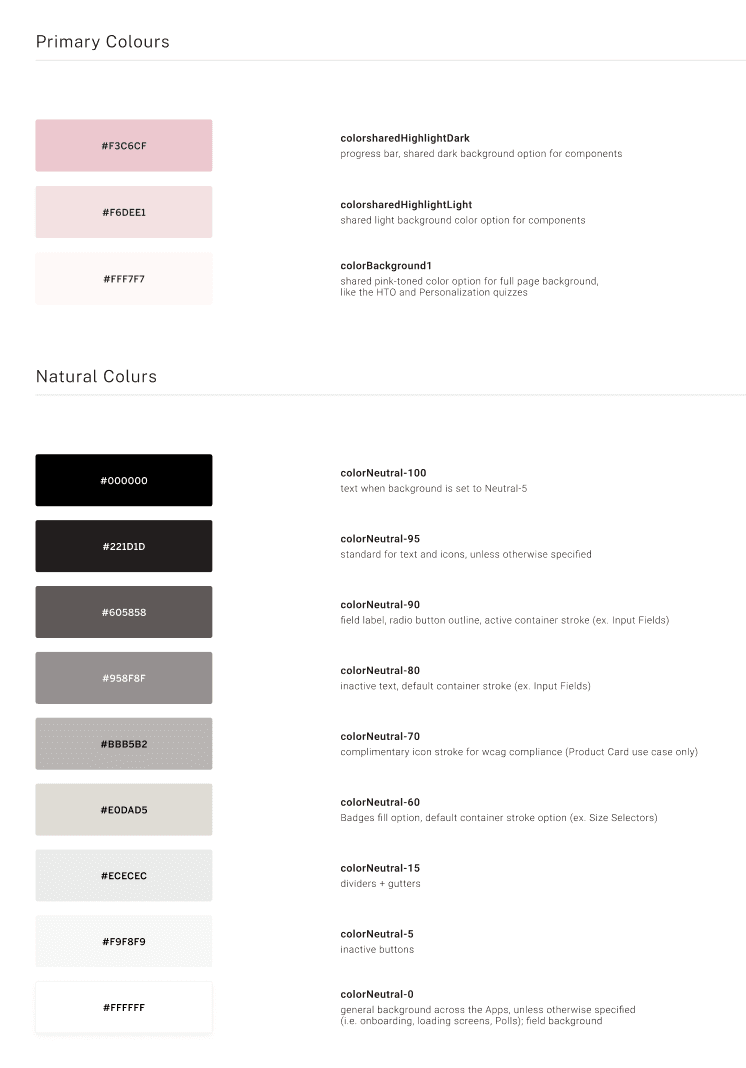
Design System
A design system is more than components—it’s the language of our product. Our design system ensures consistency, scalability, and efficiency across all store experiences.


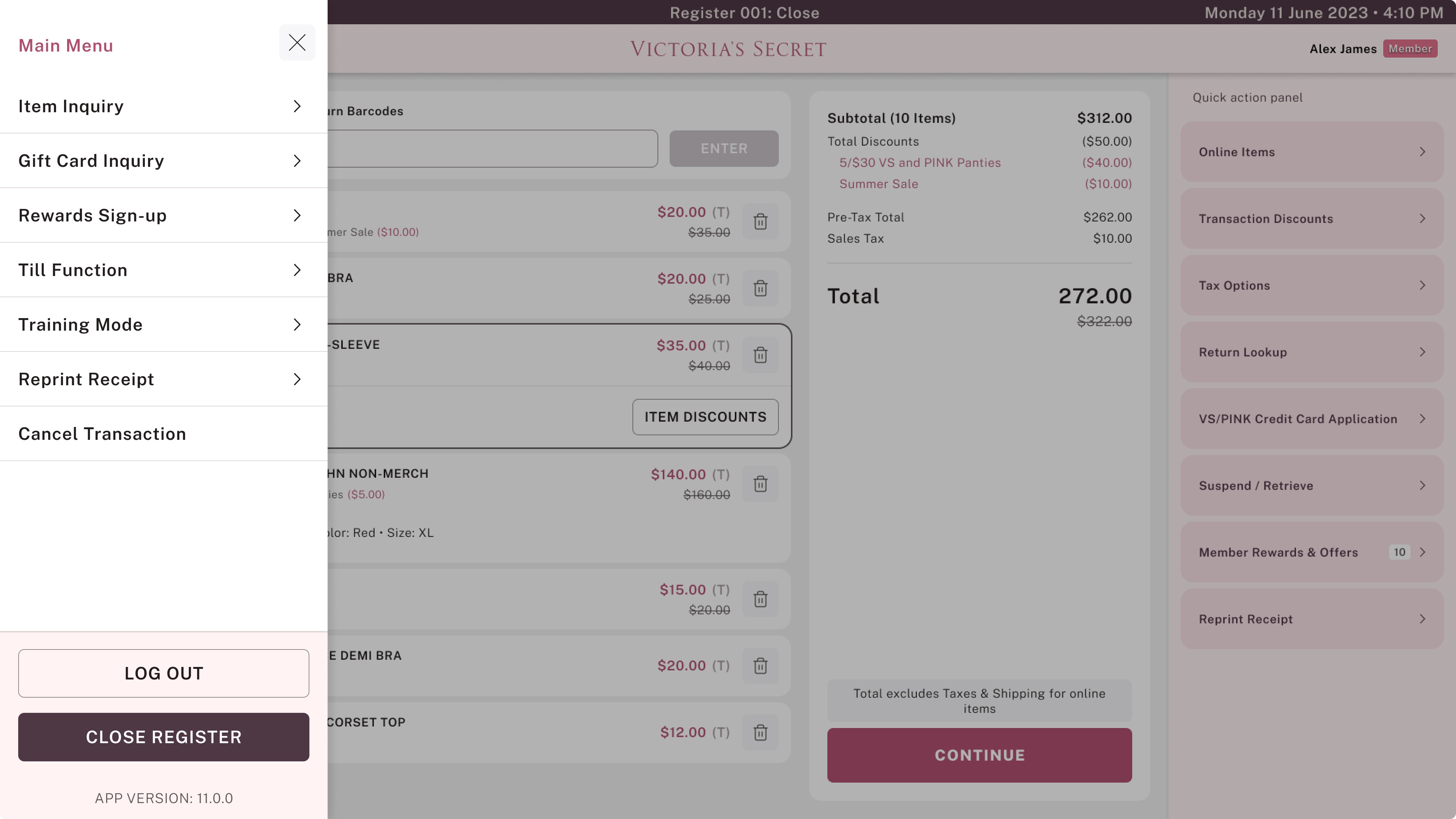
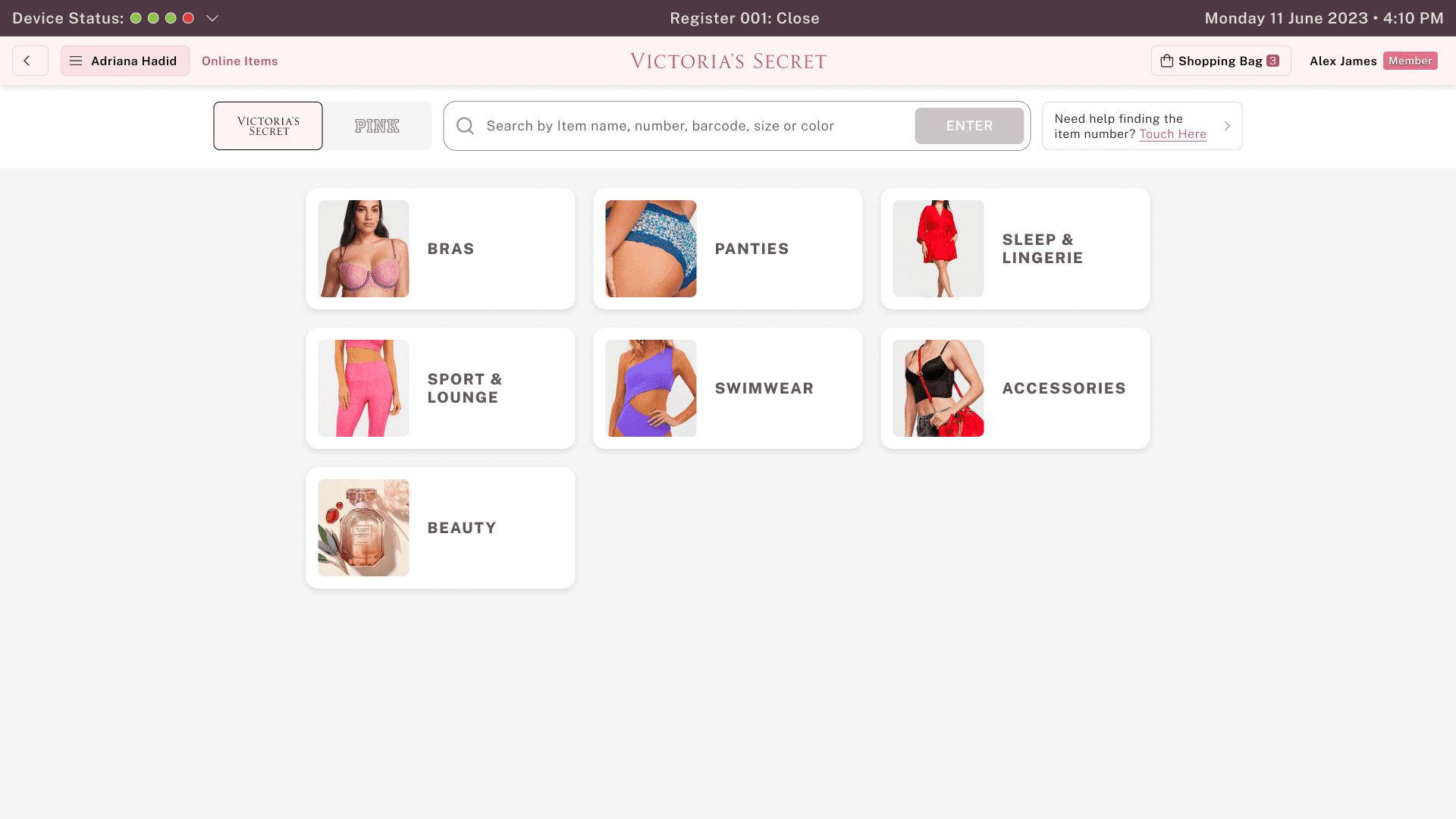
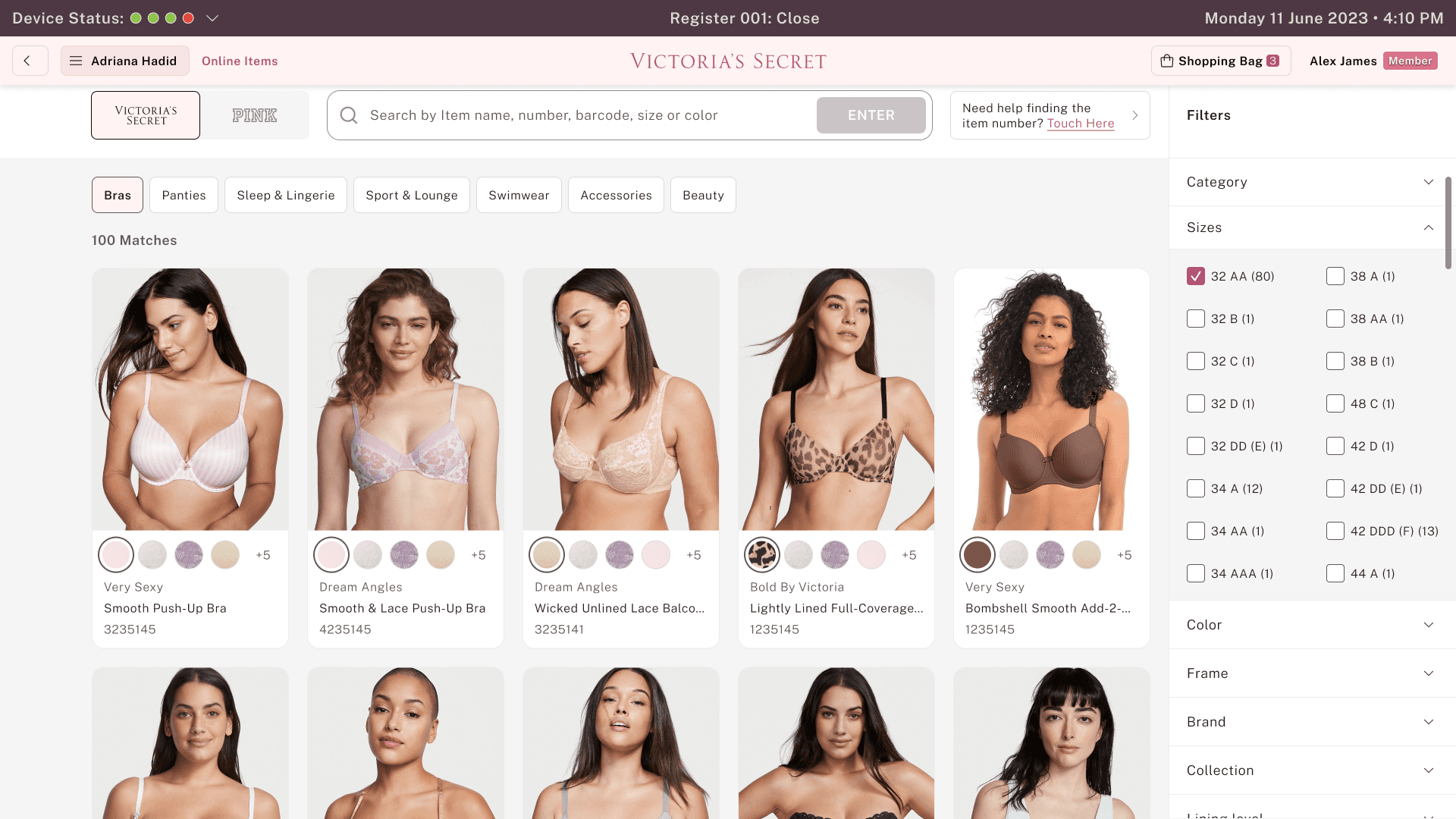
Final Hi-Fi Designs
Design Solution
By keeping real users at the center, we conducted workshops after each flow to capture early feedback and refine the designs iteratively.






Business Impact & Outcomes
The POS solution scaled quickly, improving both customer experience and store efficiency.
$3M+ Revenue Impact
Enabled through SOOS - online order placements in store (During March to Sep).
30% Reduced transaction time
By simplifying and restructuring the navigation, we reduced the number of interactions required, resulting in faster transaction completion.
Higher CSAT & NPS
Boosted customer satisfaction and loyalty.
1000+ Stores
Rolled out in US across
1000+ locations.
Associates Reviews
Direct feedback from store associates highlights how POS has improved their daily workflow, efficiency, and ability to deliver better customer service.
“Checkout feels much faster now. I don’t have to click through multiple screens just to finish a sale, which really helps during rush hours.”
“The POS is easy to understand, even for new associates. I was comfortable using it within my first few shifts without constantly asking for help.”
“Everything I need at checkout is clear and well-organized. Billing, rewards, and returns are simple to handle without slowing down the line.”
Reflection & Learnings
Learnings from simplifying complex POS workflows at scale
Designing for Speed Is Designing for People
Designing for speed isn’t just about efficiency—it directly affects associate confidence and customer satisfaction. Reducing cognitive load and interaction steps had a greater impact than adding new functionality.
Real-World Context Shapes Better Decisions
Observing associates in fast-paced store environments revealed constraints that don’t surface in documentation. Designing with real-world pressure, interruptions, and peak-hour behavior in mind led to more practical POS solutions.
Designing Systems, Not Screens
This project reinforced the importance of thinking beyond individual screens. Building a scalable, system-driven POS experience made it easier to evolve workflows over time without reintroducing complexity.

This project demonstrated how thoughtful, system-driven UX can simplify complex operational workflows—improving efficiency for associates while creating better in-store experiences for customers at scale.

Thank You
Thank you for putting so much time and attention into exploring this journey.

Krati Agarwal
Lead UX Designer