Reimagining
Store POS
Reimagining
Store POS
Reimagining
Store POS
Reimagining
Store POS
A mobile-first POS that enables associates to assist customers anywhere in-store.
A mobile-first POS that enables associates to assist customers anywhere in-store.
A mobile-first POS that enables associates to assist customers anywhere in-store.
A mobile-first POS that enables associates to assist customers anywhere in-store.
85% High Adoption
85% High Adoption
Majority of associates quickly integrated the mobile POS into their workflow.
Majority of associates quickly integrated the mobile POS into their workflow.
$3M+ Revenue Impact
$3M+ Revenue Impact
Enabled through online order placements in store.
Enabled through online order placements in store.
Assist Anywhere in the Store
Assist Anywhere in the Store
Empowered associates to serve customers anywhere
on the floor.
Empowered associates to serve customers anywhere
on the floor.
Higher CSAT & NPS
Higher CSAT & NPS
Boosted customer satisfaction and net promoter score.
Boosted customer satisfaction and net promoter score.


85% Adoption
85% Adoption
Associates found the tool highly valuable to serve customers.
Associates found the tool highly valuable to serve customers.
$3M+ Revenue Impact
$3M+ Revenue Impact
Enabled through online order placements in store.
Enabled through online order placements in store.
Assist Anywhere
Assist
Anywhere
Empowered associates to serve customers anywhere
on the floor.
Empowered associates to serve customers anywhere
on the floor.
Higher CSAT & NPS
Higher
CSAT & NPS
Boosted customer satisfaction and net promoter score.
Boosted customer satisfaction and net promoter score.
About Project
About Project
About Project
At Victoria’s Secret, I designed the mobile-first POS to empower associates to assist customers anywhere on the floor. The solution reduced checkout time, enabled online order placements, and drove higher customer satisfaction and revenue.
At Victoria’s Secret, I designed the mobile-first POS to empower associates to assist customers anywhere on the floor. The solution reduced checkout time, enabled online order placements, and drove higher customer satisfaction and revenue.
At Victoria’s Secret, I designed the mobile-first POS to empower associates to assist customers anywhere on the floor. The solution reduced checkout time, enabled online order placements, and drove higher customer satisfaction and revenue.
Krati Agarwal
Krati Agarwal
Lead UX Design, Researcher
Lead UX Design, Researcher
Lead UX Design, Researcher
Team: 2 UX designers and a UX researcher
Team: 2 UX designers and a UX researcher
Team: 2 UX designers and a UX researcher
Timeline: 6 months (Sep 2023 - Mar 2024)
Timeline: 6 months
(Sep 2023 - Mar 2024)
Timeline: 6 months (Sep 2023 - Mar 2024)
Problem Overview
The moment we’re fixing
The moment we’re fixing
The moment we’re fixing
The Moment We’re Fixing
Long lines, slow lookups, and lost sales at peak hours.
Long lines, slow lookups, and
lost sales at peak hours.
Long lines, slow lookups, and lost sales at peak hours.
Long lines, slow lookups, and lost sales at peak hours.
Problem Overview
Problem Overview
Problem Overview
Long waits lose sales, while limited mobility keeps associates stuck at the counter
Long waits lose sales, while limited mobility keeps associates stuck at the counter
Long waits lose sales, while limited mobility keeps associates stuck at the counter

Weekend rush at Victoria’s Secret
Long checkout lines frustrate customers
Long checkout lines frustrate customers
Shoppers often wait 5–7 minutes in line during rush hours — enough to cause frustration and drop-offs.
Shoppers often wait 5–7 minutes in line during rush hours — enough to cause frustration and drop-offs.
Shoppers often wait 5–7 minutes in line during rush hours — enough to cause frustration and drop-offs.
With most stores tied to fixed checkouts,
With most stores tied to fixed checkouts,
Staff miss opportunities to assist or upsell, while customers wait (or leave).
Staff miss opportunities to assist or upsell, while customers wait (or leave).
Staff miss opportunities to assist or upsell, while customers wait (or leave).
Slow Checkout Process
Slow Checkout Process
Manual steps and limited counters slow down checkout during peak hours.
Manual steps and limited counters slow down checkout during peak hours.
Manual steps and limited counters slow down checkout during peak hours.
Research & Discovery
Research & Discovery
Research & Discovery
Observing Current Experience - Pain-points & Behaviour
Observing Current Experience - Pain-points & Behaviour
Observing Current Experience - Pain-points & Behaviour
Observing Current Experience - Pain-points & Behaviour
We conducted workshops with key store stakeholders—including Store Associates and Product Managers—to gain a comprehensive understanding of the challenges and pain points in the current POS systems.
All insights, scenarios, and workflows from these sessions were documented in a Miro board, which also includes affinity mapping and organized clusters of findings:
We conducted workshops with key store stakeholders—including Store Associates, Product Managers, and Developers—to gain a deep understanding of the challenges and pain points in the current POS systems.
To document these insights, we created a FigJam board capturing all existing scenarios and the processes involved in the current POS workflows.
We conducted workshops with key store stakeholders—including Store Associates and Product Managers—to gain a comprehensive understanding of the challenges and pain points in the current POS systems.
All insights, scenarios, and workflows from these sessions were documented in a Miro board, which also includes affinity mapping and organized clusters of findings:
We conducted workshops with key store stakeholders—including Store Associates, Product Managers, and Developers—to gain a deep understanding of the challenges and pain points in the current POS systems.
To document these insights, we created a FigJam board capturing all existing scenarios and the processes involved in the current POS workflows.

Research & Discovery
Research & Discovery
Research & Discovery
Store associates are at the heart of every in-store experience — from assisting customers to managing transactions efficiently. However, legacy POS systems often slow down workflows, leading to frustration, reduced productivity, and missed sales opportunities.
To create an experience that truly supports associates, it’s essential to understand their day-to-day challenges, device interactions, and expectations from a modern POS system, our team aimed to deeply understand how associates interact with POS tools in real environments.
Store associates are at the heart of every in-store experience — from assisting customers to managing transactions efficiently. However, legacy POS systems often slow down workflows, leading to frustration, reduced productivity, and missed sales opportunities.
To create an experience that truly supports associates, it’s essential to understand their day-to-day challenges, device interactions, and expectations from a modern POS system, our team aimed to deeply understand how associates interact with POS tools in real environments.
Research Plan & Insights
Research Plan & Insights
Our researchers visited 11 stores to observe real in-store scenarios, capturing how associates interact with customers, manage transactions, and navigate the POS and mPOS systems during daily operations.
Sample Questions:
Focus Area:
Sample Questions
Workflow
Walk me through your typical day — what are your top recurring POS tasks?
Pain Points
When do you feel the system slows you down or gets in your way?
Efficiency
Are there moments when you need to switch between multiple systems or devices?
Error Handling
What happens when a product isn’t found in the system?
Expectations
If you could change one thing about the POS, what would it be?
Customer Impact
How does the current POS affect your interaction with customers?
Slow System
Slow System
Slow System
POS slows down during peak hours, frustrating staff and customers.
POS slows down during peak hours, frustrating staff and customers.
POS slows down during peak hours, frustrating staff and customers.
Too many steps
Too many steps
Too many steps
Applying promotions or offers takes multiple steps, slowing down checkout.
Applying promotions or offers takes multiple steps, slowing down checkout.
Applying promotions or offers takes multiple steps, slowing down checkout.
Poor Navigation
Poor Navigation
Poor Navigation
Switching between multiple screens is confusing and reduces efficiency.
Switching between multiple screens is confusing and reduces efficiency.
Switching between multiple screens is confusing and reduces efficiency.
Lack of Guidance
Lack of Guidance
Lack of Guidance
Associates often rely on manuals or peers for basic tasks.
Associates often rely on manuals or peers for basic tasks.
Associates often rely on manuals or peers for basic tasks.
“Sometimes the system lags so much during sales that customers get impatient.“
~ Store Associate
“Sometimes the system lags so much during sales that customers get impatient.“
~ Store Associate
It takes too many clicks just to apply a simple discount.
~ Store Associate
It takes too many clicks just to apply a simple discount.
~ Store Associate
I keep going back to the manual for tasks I should already know.
~ Store Associate
I keep going back to the manual for tasks I should already know.
~ Store Associate
Research & Discovery
Research & Discovery
Research & Discovery
Competitive Research:
Mobile POS & On-Floor Checkout
Competitive Research:
Mobile POS & On-Floor Checkout
Competitive Research:
Mobile POS & On-Floor Checkout
Leading brands are already leveraging mobile POS to redefine their in-store experience:
Leading brands are already leveraging mobile POS to redefine their in-store experience:

Marks & Spencer
Marks & Spencer
Pay With Me — scan & pay via app;
seamless 10-second checkout.
Pay With Me — scan & pay via app;
seamless 10-second checkout.

Nordstrom
Nordstrom
mPOS in departments since ~2011; on-the-floor checkout with receipts.
mPOS in departments since ~2011; on-the-floor checkout with receipts.

Nike
Nike
Nike integrates mobile checkout into both its in-store experience and Nike Membership app.
Nike integrates mobile checkout into both its in-store experience and Nike Membership app.

Walmart
Walmart
Associates using handheld mPOS to serve customers throughout the store.
Associates using handheld mPOS to serve customers throughout the store.

The North Face
The North Face
Apple device-based mPOS via Aptos/NewStore for immersive sales.
Apple device-based mPOS via Aptos/NewStore for immersive sales.

Zara
Zara
Mobile-enabled stock lookup + checkout. Allow customers to reserve, pick up, or return items with minimal friction.
Mobile-enabled stock lookup + checkout. Allow customers to reserve, pick up, or return items with minimal friction.
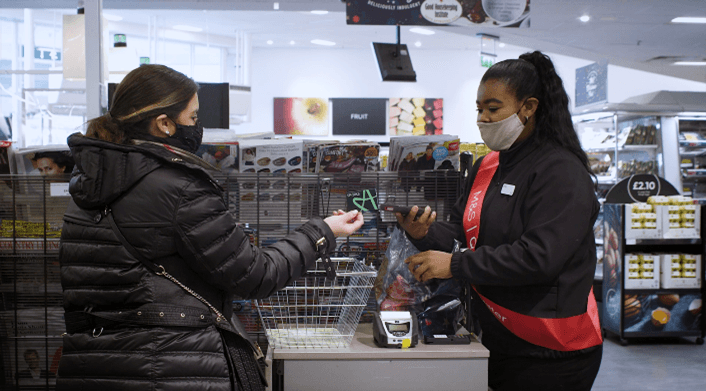
Marks & Spencer: “Pay With Me”
Marks & Spencer: “Pay With Me”
Marks & Spencer: “Pay With Me”
Marks & Spencer: “Pay With Me”
Marks & Spencer launched “Pay With Me” as a way to tackle long checkout lines during peak periods.
Store associates carry mobile devices that allow them to scan items and process payments anywhere in the store.
Highlights:
Mobile device–based checkout
Card/contactless payments supported
Optimized for peak hours
Marks & Spencer launched “Pay With Me” as a way to tackle long checkout lines during peak periods.
Store associates carry mobile devices that allow them to scan items and process payments anywhere in the store.
Highlights:
Mobile device–based checkout
Card/contactless payments supported
Optimized for peak hours
Marks & Spencer launched “Pay With Me” as a way to tackle long checkout lines during peak periods.
Store associates carry mobile devices that allow them to scan items and process payments anywhere in the store.
Highlights:
Mobile device–based checkout
Card/contactless payments supported
Optimized for peak hours
Marks & Spencer launched “Pay With Me” as a way to tackle long checkout lines during peak periods.
Store associates carry mobile devices that allow them to scan items and process payments anywhere in the store.
Highlights:
Mobile device–based checkout
Card/contactless payments supported
Optimized for peak hours
Pay With Me customer feedback
Pay With Me customer feedback
Pay With Me customer feedback
“It felt great to be pulled out of the queue. It definitely improved my shopping experience. I’m surprised other retailers aren’t doing this.”
“It felt great to be pulled out of the queue. It definitely improved my shopping experience. I’m surprised other retailers aren’t doing this.”
“It felt great to be pulled out of the queue. It definitely improved my shopping experience. I’m surprised other retailers aren’t doing this.”
“It felt great to be pulled out of the queue. It definitely improved my shopping experience. I’m surprised other retailers aren’t doing this.”
“It felt great to be pulled out of the queue. It definitely improved my shopping experience. I’m surprised other retailers aren’t doing this.”
“It felt great to be pulled out of the queue. It definitely improved my shopping experience. I’m surprised other retailers aren’t doing this.”
View Complete Research Here
View Complete Research Here
Recognizing the Need for a Mobile POS Solution
Empowering Associates with a Seamless, On-the-Floor Tool to Improve Efficiency and Customer Experience
Empowering Associates with a Seamless, On-the-Floor Tool to Improve Efficiency and Customer Experience
Through our research, we observed that associates face repeated challenges while assisting customers on the sales floor — from checking stock and promotions to processing returns and online orders. These pain points highlighted a critical need for a mobile POS device that allows associates to complete tasks anywhere on the floor, without being tied to the checkout counter. By enabling on-the-spot product lookup, seamless transactions, and faster customer interactions, the mPOS solution empowers associates to work efficiently while providing a smoother, more engaging in-store experience.


Who Are Our Users
Who Are Our Users
Who Are Our Users
Store Associates handling floor and counter tasks
Mix of full-time, part-time, and new hires
Shift patterns: 2–4 associates at checkout during peak hours, others rotate on the floor
Key tasks: Customer consultations, scanning, placing orders, rewards enrolment, returns/exchanges.
Tech comfort: Ranges from tech-savvy to needing guidance.
Pain points: Slow workflows, multi-step processes, limited mobility, lack of real-time inventory visibility
Store Associates handling floor and counter tasks
Mix of full-time, part-time, and new hires
Shift patterns: 2–4 associates at checkout during peak hours, others rotate on the floor
Key tasks: Customer consultations, scanning, placing orders, rewards enrolment, returns/exchanges.
Tech comfort: Ranges from tech-savvy to needing guidance.
Pain points: Slow workflows, multi-step processes, limited mobility, lack of real-time inventory visibility
Checkout Specialists
Primarily at cash wrap/checkout counters
Billing, applying offers, rewards signup, handling refurns and exchanges.
Long queues, slow systems, confusing offer application

Floor Advisior
On the sales floor assisting customers
Product lookup, size & availability check, fitting room support, upselling
Guide customers quickly, improve conversion

Hybrid Associates
Switch between floor & counter depending on rush hours
Support checkout during peak, assist on floor during off-peak
Balance both customer support & checkout

New
New & part-time associate -
Require training
Primarily at cash wrap/checkout counters
Billing, applying offers, rewards signup, handling refurns
Long queues, slow systems, confusing offer application
Designing for Every Role
Designing for Every Role
Designing for Every Role
When designing the POS system, we realized that not all store team members interact with the system in the same way. Their responsibilities, experience levels, and goals differ, so the design needed to reflect that.
When designing the POS system, we realized that not all store team members interact with the system in the same way. Their responsibilities, experience levels, and goals differ, so the design needed to reflect that.
When designing the POS system, we realized that not all store team members interact with the system in the same way. Their responsibilities, experience levels, and goals differ, so the design needed to reflect that.
Store Managers
We wanted to build something that makes it easy to review and approve tasks quickly.
Needs oversight of inventory, transaction history, and approvals.
We wanted to build something that makes it easy to review and approve tasks quickly.
Needs oversight of inventory, transaction history, and approvals.
Store Associates
Assist customer faster, do checkout, returns on the floor and more.
Prioritizes speed & ease-of-use, doesn’t want to fumble in front of customers.
Assist customer faster, do checkout, returns on the floor and more.
Prioritizes speed & ease-of-use, doesn’t want to fumble in front of customers.
For New or Part-time Associates:
Since training time is short, we wanted to make the app intuitive enough to be picked up right away, so new associates can support the team without heavy onboarding.
Since training time is short, we wanted to make the app intuitive enough to be picked up right away, so new associates can support the team without heavy onboarding.
Research & Discovery
Research & Discovery
Research & Discovery
User Personas
User Personas
Meet the associates who keep our store running: full-time and part-time staff juggling shifts, checkout counters, and floor duties, each with their own comfort level and challenges using the POS system.
Meet the associates who keep our store running: full-time and part-time staff juggling shifts, checkout counters, and floor duties, each with their own comfort level and challenges using the POS system.
Meet the associates who keep our store running: full-time and part-time staff juggling shifts, checkout counters, and floor duties, each with their own comfort level and challenges using the POS system.
Meet the associates who keep our store running: full-time and part-time staff juggling shifts, checkout counters, and floor duties, each with their own comfort level and challenges using the POS system.
Jessica Miller
New Part-Time Associate
22 Year Old, Full Time, 1 months at VS
22 Year Old, Full Time, 1 months at VS
just want to feel confident helping customers and using the POS correctly.
Responsibilities
Learning store layout
Assisting with simple customer inquiries
Handling POS under supervision
Processing returns, exchanges
Challenges
Needs training to learn POS work flows
Managing busy times,
Remembering promotions and sizing
Zoe Thompson
Sales Associate
22 Year Old, Full Time, 3 months at VS
22 Year Old, Full Time, 3 months at VS
I want to make sure customer should leave feeling valued and satisfied.
Responsibilities
Cash register operations
Processing transactions efficiently
Managing loyalty programs
Processing returns, exchanges
Challenges
Managing long checkout lines
Handling complex returns and exchange
Troubleshooting POS system issues
Maria Santos
Sales Associate
25 Year Old, Full Time, 2 Years at VS
25 Year Old, Full Time, 2 Years at VS
“I want to make checkout fast and keep the customer happy and satisfied with the purchase.”
Responsibilities
Cash register operations
Processing customer transactions efficiently
Managing store credit cards and loyalty programs
Processing returns, exchanges
Maintaining cash drawer accuracy and end-of-day reconciliation
Challenges
Managing long checkout lines during peak hours
Handling complex returns and exchange
Troubleshooting POS system issues
Dealing with payment disputes and declined cards
Modules
Modules
Modules
From concept to launch, here are a few core flows we designed to enhance store efficiency
From concept to launch, here are a few core flows we designed to enhance store efficiency
From concept to launch, here are a few core flows we designed to enhance store efficiency
From concept to launch, here are a few core flows we designed to enhance store efficiency
01
01
Scan & Go
Scan & Go
Associates can scan items and complete purchases with mobile pay right on the sales floor—no need to stay tied to the counter.
Associates can scan items and complete purchases with mobile pay right on the sales floor—no need to stay tied to the counter.
02
02
SOOS -Item out of stock
SOOS -Item out of stock
If an item is out of stock in-store, associates can instantly place an online order and have it shipped to the customer—turning a lost sale into a win.
If an item is out of stock in-store, associates can instantly place an online order and have it shipped to the customer—turning a lost sale into a win.
03
03
Rewards Sign-up
Rewards Sign-up
Seamless enrollment flow that enables associates to sign up customers for the loyalty program in under a minute.
Seamless enrollment flow that enables associates to sign up customers for the loyalty program in under a minute.
04
04
Easy Returns
Easy Returns
Seamless enrollment flow that enables associates to sign up customers for the loyalty program in under a minute.
Seamless enrollment flow that enables associates to sign up customers for the loyalty program in under a minute.
Designing with Familiarity in Mind
Designing with Familiarity in Mind
Designing with Familiarity in Mind
👉 Most importantly, we didn’t want to disrupt existing habits. Associates are already used to one application, so instead of forcing them to relearn workflows, we focused on improving flows, removing friction, and enhancing usability — while preserving familiar processes.
👉 Most importantly, we didn’t want to disrupt existing habits. Associates are already used to one application, so instead of forcing them to relearn workflows, we focused on improving flows, removing friction, and enhancing usability — while preserving familiar processes.
👉 Most importantly, we didn’t want to disrupt existing habits. Associates are already used to one application, so instead of forcing them to relearn workflows, we focused on improving flows, removing friction, and enhancing usability — while preserving familiar processes.
Start
Scan Product(s) Barcode
using mPOS camera/scanner.
Shopping Bag
Bag shows list of scanned products + quantity + total price.
Select Debit / Credit Card, Gift Card
Payment via Aurus Vayu
Payment Success
e-Receipt
Sends digital receipt to customer.
User Flows
User Flows
User Flows
We mapped the end-to-end journey to understand how associates interact with mPOS across key touch points.
Please check our figjam for the detailed flow analysis:
We mapped the end-to-end journey to understand how associates interact with mPOS across key touch points.
Please check our figjam for the detailed flow analysis:
We mapped the end-to-end journey to understand how associates interact with mPOS across key touch points.
Please check our figjam for the detailed flow analysis:
We mapped the end-to-end journey to understand how associates interact with mPOS across key touch points.
Please check our figjam for the detailed flow analysis:
Streamlining Checkout with IA
Streamlining Checkout
with IA
Streamlining Checkout with IA
We designed the mobile POS Information Architecture to organize every step of the sales process—finding products, checking inventory, accessing customer info, and completing payments—so associates can serve customers quickly and efficiently.
We designed the mobile POS Information Architecture to organize every step of the sales process—finding products, checking inventory, accessing customer info, and completing payments—so associates can serve customers quickly and efficiently.
We designed the mobile POS Information Architecture to organize every step of the sales process—finding products, checking inventory, accessing customer info, and completing payments—so associates can serve customers quickly and efficiently.
We designed the mobile POS Information Architecture to organize every step of the sales process—finding products, checking inventory, accessing customer info, and completing payments—so associates can serve customers quickly and efficiently.


Wireframes
Wireframes
Wireframes
Wireframes
We started with wireframing to define clear structure, hierarchy, and user flows. This helped us uncover limitations early and gather feedback from stakeholders like Store Ops, Tech, and Product teams.
We started with wireframing to define clear structure, hierarchy, and user flows. This helped us uncover limitations early and gather feedback from stakeholders like Store Ops, Tech, and Product teams.
We started with wireframing to define clear structure, hierarchy, and user flows. This helped us uncover limitations early and gather feedback from stakeholders like Store Ops, Tech, and Product teams.
We started with wireframing to define clear structure, hierarchy, and user flows. This helped us uncover limitations early and gather feedback from stakeholders like Store Ops, Tech, and Product teams.
Build Our Design Language
Build Our Design Language
Build Our Design Language
Build Our Design Language
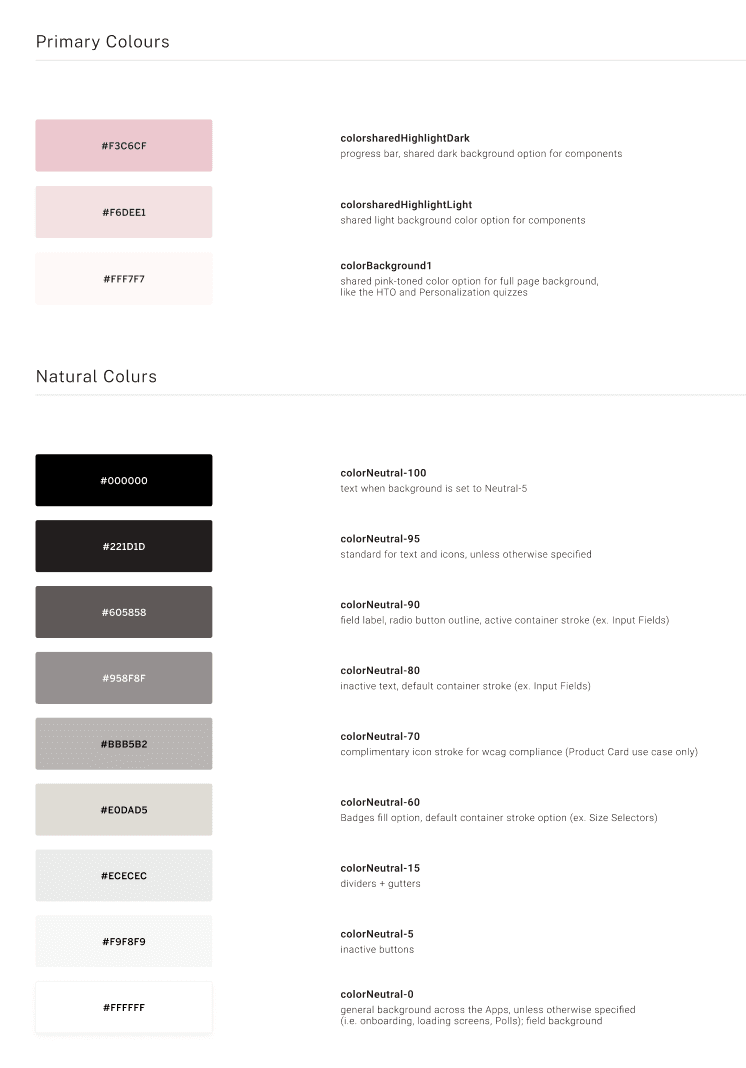
A design system is more than components—it’s the language of our product. Our design system ensures consistency, scalability, and efficiency across all store experiences.
A design system is more than components—it’s the language of our product. Our design system ensures consistency, scalability, and efficiency across all store experiences.
A design system is more than components—it’s the language of our product. Our design system ensures consistency, scalability, and efficiency across all store experiences.
A design system is more than components—it’s the language of our product. Our design system ensures consistency, scalability, and efficiency across all store experiences.


Final Designs
Final Designs
From store floors to digital platform — designing experiences that matter.
From store floors to digital platform — designing experiences that matter.
From store floors to digital platform — designing experiences that matter.


Scan & Checkout Flow
Scan & Checkout Flow
Scan & Checkout Flow
Enables associates to scan items and complete purchases directly on the floor, giving customers a faster and line-free checkout experience.
Enables associates to scan items and complete purchases directly on the floor, giving customers a faster and line-free checkout experience.
Enables associates to scan items and complete purchases directly on the floor, giving customers a faster and line-free checkout experience.
Enables associates to scan items and complete purchases directly on the floor,
giving customers a faster and line-free checkout experience.

Rewards Membership Sign Up Flow
Rewards Membership Sign Up Flow
Rewards Membership Sign Up Flow
Easily enroll customers into the rewards program during checkout, helping them unlock offers, earn points, and stay engaged with the brand.
Easily enroll customers into the rewards program during checkout, helping them unlock offers, earn points, and stay engaged with the brand.


Search for Out of Stock (SOOS) Flow
Search for Out of Stock (SOOS) Flow
Search for Out of Stock (SOOS) Flow
Search for Out of Stock (SOOS) Flow
If an item is out of stock, associates can quickly place an online order for home delivery or pickup—ensuring customers never miss out on what they need.
If an item is out of stock, associates can quickly place an online order for home delivery or pickup—ensuring customers never miss out on what they need.
If an item is out of stock, associates can quickly place an online order for home delivery or pickup—ensuring customers never miss out on what they need.

Inventory Look Up
Inventory Look Up
Inventory Look Up
Allows associates to check real-time product availability across stores and online, helping customers quickly find the right size, style, or color.
Allows associates to check real-time product availability across stores and online, helping customers quickly find the right size, style, or color.
Allows associates to check real-time product availability across stores and online, helping customers quickly find the right size, style, or color.
Gift Card Inquiry & Sale Flow
Gift Card Inquiry & Sale Flow
Gift Card Inquiry & Sale Flow
Gift Card Inquiry & Sale Flow
Enables associates to check balances, activate, or sell gift cards instantly—offering customers a convenient and flexible way to shop or gift.
Enables associates to check balances, activate, or sell gift cards instantly—offering customers a convenient and flexible way to shop or gift.
Enables associates to check balances, activate, or sell gift cards instantly—offering customers a convenient and flexible way to shop or gift.

Usability Testing
Usability Testing
Usability Testing
Usability Testing
Approach
Approach
Approach
Approach
We recruited 5 store associates to test the mPOS Figma prototype and asked them to complete real-world flows: logging in, scanning products, adding items to bag, and checking out.
We recruited 5 store associates to test the mPOS Figma prototype and asked them to complete real-world flows: logging in, scanning products, adding items to bag, and checking out.
We recruited 5 store associates to test the mPOS Figma prototype and asked them to complete real-world flows: logging in, scanning products, adding items to bag, and checking out.
We recruited 5 store associates to test the mPOS Figma prototype and asked them to complete real-world flows: logging in, scanning products, adding items to bag, and checking out.
Shopping Bag
Shopping Bag
Shopping Bag
❌ Before (Issues):
Discounts/rewards placement was not obvious.
No way to tag a customer directly in the shopping bag.
If the customer was added later (after “Continue”), associates were unsure how to apply rewards/discounts.
Transaction Discounts were hidden under the three-dot menu
❌ Before (Issues):
Discounts/rewards placement was not obvious.
No way to tag a customer directly in the shopping bag.
If the customer was added later (after “Continue”), associates were unsure how to apply rewards/discounts.
Transaction Discounts were hidden under the three-dot menu
❌ Before (Issues):
Discounts/rewards placement was not obvious.
No way to tag a customer directly in the shopping bag.
If the customer was added later (after “Continue”), associates were unsure how to apply rewards/discounts.
Transaction Discounts were hidden under the three-dot menu
❌ Before (Issues):
Discounts/rewards placement was not obvious.
No way to tag a customer directly in the shopping bag.
If the customer was added later (after “Continue”), associates were unsure how to apply rewards/discounts.
Transaction Discounts were hidden under the three-dot menu
✅ After (Improvements)
Introduced an inline customer tagging option in the shopping bag, making it easier to link accounts and apply rewards before checkout.
Added “Add More Discount” option in the bag for better visibility.
Rewards visible in bag after customer linking.
✅ After (Improvements)
Introduced an inline customer tagging option in the shopping bag, making it easier to link accounts and apply rewards before checkout.
Added “Add More Discount” option in the bag for better visibility.
Rewards visible in bag after customer linking.
✅ After (Improvements)
Introduced an inline customer tagging option in the shopping bag, making it easier to link accounts and apply rewards before checkout.
Added “Add More Discount” option in the bag for better visibility.
Rewards visible in bag after customer linking.
✅ After (Improvements)
Introduced an inline customer tagging option in the shopping bag, making it easier to link accounts and apply rewards before checkout.
Added “Add More Discount” option in the bag for better visibility.
Rewards visible in bag after customer linking.
Before

Associate unsure where to apply Rewards Discount
Associate unsure where to apply Rewards Discount
Associate unsure where to apply Rewards Discount
01
No way to tag a customer directly in the shopping bag.
If the customer was added later (after “Continue”), associates were unsure how to apply rewards/discounts.
No way to tag a customer directly in the shopping bag.
If the customer was added later (after “Continue”), associates were unsure how to apply rewards/discounts.
No way to tag a customer directly in the shopping bag.
If the customer was added later (after “Continue”), associates were unsure how to apply rewards/discounts.
03
02
Unsure how to apply Transaction Discounts
Transaction Discounts were hidden under the three-dot menu
Unsure how to apply Transaction Discounts
Transaction Discounts were hidden under the three-dot menu
02
01

After
Added inline customer tagging in the bag for easier rewards application.
Added inline customer tagging in the bag for easier rewards application.
Added inline customer tagging in the bag for easier rewards application.
01
Added “Add More Discount” option in the bag for better visibility.
Added “Add More Discount” option in the bag for better visibility.
02
Rewards visible in bag after customer linking
Rewards visible in bag after customer linking
01
03
Business Impact & Outcomes
Business Impact & Outcomes
Business Impact & Outcomes
Business Impact & Outcomes
The mPOS solution scaled quickly, improving both customer experience and store efficiency.
Efficiency Gains – Reduced order processing and checkout times, making daily tasks faster and smoother.
Workflow Impact: Associates report faster checkout and smoother order handling.
Assist Anywhere: Associates could assist customers without leaving the shop floor.
Positive Feedback: Majority of associates find it highly useful for in-store operations
Higher CSAT & NPS Score: Enhanced customer satisfaction & Net Promoter Score.
The mPOS solution scaled quickly, improving both customer experience and store efficiency.
Efficiency Gains – Reduced order processing and checkout times, making daily tasks faster and smoother.
Workflow Impact: Associates report faster checkout and smoother order handling.
Assist Anywhere: Associates could assist customers without leaving the shop floor.
Positive Feedback: Majority of associates find it highly useful for in-store operations
Higher CSAT & NPS Score: Enhanced customer satisfaction & Net Promoter Score.
The mPOS solution scaled quickly, improving both customer experience and store efficiency.
Efficiency Gains – Reduced order processing and checkout times, making daily tasks faster and smoother.
Workflow Impact: Associates report faster checkout and smoother order handling.
Assist Anywhere: Associates could assist customers without leaving the shop floor.
Positive Feedback: Majority of associates find it highly useful for in-store operations
Higher CSAT & NPS Score: Enhanced customer satisfaction & Net Promoter Score.
The mPOS solution scaled quickly, improving both customer experience and store efficiency.
Efficiency Gains – Reduced order processing and checkout times, making daily tasks faster and smoother.
Workflow Impact: Associates report faster checkout and smoother order handling.
Assist Anywhere: Associates could assist customers without leaving the shop floor.
Positive Feedback: Majority of associates find it highly useful for in-store operations
Higher CSAT & NPS Score: Enhanced customer satisfaction & Net Promoter Score.
334 Stores
334 Stores
Rolled out nationwide across
334 locations.
Rolled out nationwide across
334 locations.
$3M+ Revenue Impact
Enabled through online order placements in store.
85% Adoption & Engagement Rate
85% Adoption & Engagement Rate
The majority of associates quickly integrated the mobile POS into their workflow.
Assist Anywhere
Empowered associates to serve customers across the floor.
Higher CSAT & NPS
Higher CSAT & NPS
Boosted customer satisfaction and loyalty.
Boosted customer satisfaction and loyalty.
Associates Reviews
Associates Reviews
Associates Reviews
Most associates found the mobile POS highly valuable, noting that it streamlined order processing and checkout, making daily tasks faster and more efficient.
“With mPOS, I don’t need to walk customers back to the cash counter—checkout happens right where they are.”
“It saves me time during peak hours and lets me focus more on helping customers find what they need.”
Earlier, we lost sales when items were out of stock. Now, I can quickly place online orders for customers on the spot.”
Road Ahead
Road Ahead
Road Ahead
Building on the current mPOS experience, we can expand into advanced functionalities:
Building on the current mPOS experience, we can expand into advanced functionalities:
Building on the current mPOS experience, we can expand into advanced functionalities:
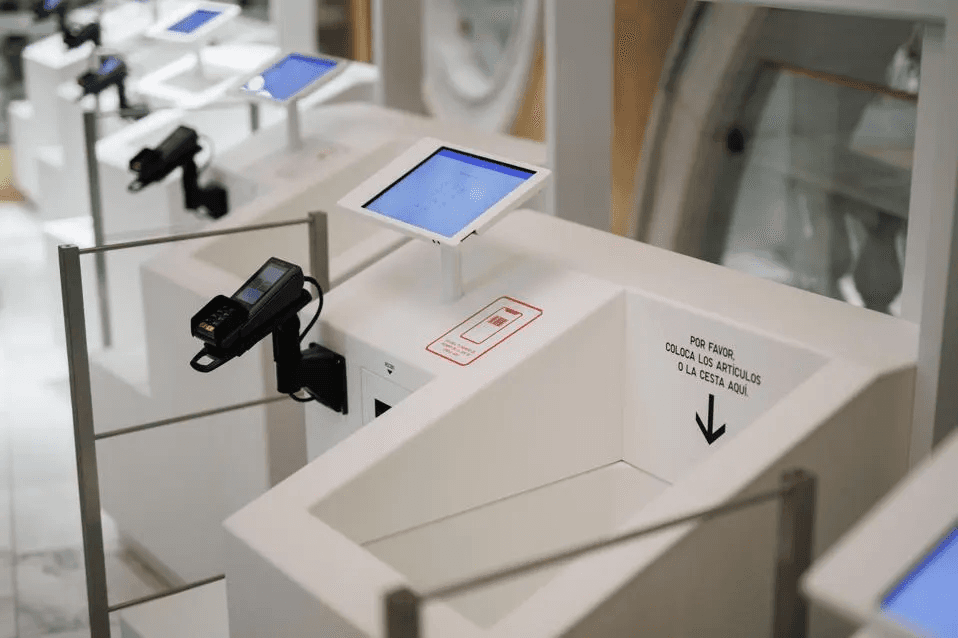
Self Checkout
Enable customers to complete purchases independently at kiosks or through their own devices.
Personalized Recommendations
Look up customer buying history or wishlist to suggest relevant products and styling options.
Reserve & Hold
Allow associates to reserve items or fitting room spots, ensuring a seamless in-store experience.
Future Integrations
Connect with loyalty programs, AI-powered styling, and real-time inventory visibility for a unified customer journey.
Self Checkout
Enable customers to complete purchases independently at kiosks or through their own devices.
Personalized Recommendations
Look up customer buying history or wishlist to suggest relevant products and styling options.
Reserve & Hold
Allow associates to reserve items or fitting room spots, ensuring a seamless in-store experience.
Future Integrations
Connect with loyalty programs, AI-powered styling, and real-time inventory visibility for a unified customer journey.
Self Checkout
Enable customers to complete purchases independently at kiosks or through their own devices.
Personalized Recommendations
Look up customer buying history or wishlist to suggest relevant products and styling options.
Reserve & Hold
Allow associates to reserve items or fitting room spots, ensuring a seamless in-store experience.
Future Integrations
Connect with loyalty programs, AI-powered styling, and real-time inventory visibility for a unified customer journey.
🌸 Thank You! 🌸
🌸 Thank You! 🌸
Thank you for putting so much time and attention into exploring this journey.
Thank you for putting so much time and attention into exploring this journey.
Thank you for putting so much time and attention into exploring this journey.

Krati Agarwal
Lead UX Designer
Lead UX Designer